Oct 1, 2012
Remove virus from pendrives(Flash drives)
If you are using pendrive for data transfer and affected by VIRUS and creates an exe file in your usb drive with the name New Folder.exe.
WITH THIS VIRUS
Task manager is disabled.
Registry Editor is disabled.
Folder options not working.
Taking too much time for accessing pendrive.
Uses half of your computers processing power.
now you can easily remove this virus
Just download the tool from the link below.
Run this downloaded exe by double clicking on it.
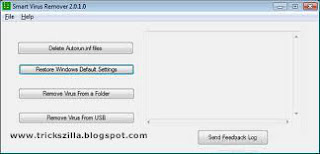
Then click on “Delete Autorun.inf file”.
After that click on ” Remove virus from USB”. The virus will be removed from your pendrive.
with this tool you cal also restore your task manager, registry editor and other things which were disabled by virus
just click on “Restore Default Windows Settings”. thats it.............
Click here to download

WITH THIS VIRUS
Task manager is disabled.
Registry Editor is disabled.
Folder options not working.
Taking too much time for accessing pendrive.
Uses half of your computers processing power.
now you can easily remove this virus
Just download the tool from the link below.
Run this downloaded exe by double clicking on it.
Then click on “Delete Autorun.inf file”.
After that click on ” Remove virus from USB”. The virus will be removed from your pendrive.
with this tool you cal also restore your task manager, registry editor and other things which were disabled by virus
just click on “Restore Default Windows Settings”. thats it.............
Click here to download
Sep 28, 2012
Unhide Files & Folders from USB Drives Hidden by Virus
If you frequently transfer your files through USB flash drives then
you must have experienced the situation where all of your folders and
files suddenly went missing. This usually happens when a virus gets into
the flash drive from an infected computer. In some of the cases the
files and folders get hidden even after cleaning the flash drive with an antivirus.
Some viruses are designed to infect and hide the files at the same time. Antivirus software are able to clean them but are not able to make them back visible in most of the cases.
I’m one of those who have encountered this dozens of times. After searching a bit over internet, I found different tricks and apps to unhide the hidden folders when it’s not possible to unhide through files or folder properties. But from all them, USB show is the one which, in my point of view, is the fastest, working and most effective solution of all.

USB Show is a lightweight but very powerful little app that allows you to unhide files and folder from any drive in just a click of a button. You can use this on hard drives partitions as well and it doesn’t require any installation.
To use it, just run the applicationa and hit “Recover the Hide File”, then browse for the drive and give the tiny app a few seconds to find an recover hidden and effected files and folders.
Download USB Show
Some viruses are designed to infect and hide the files at the same time. Antivirus software are able to clean them but are not able to make them back visible in most of the cases.
I’m one of those who have encountered this dozens of times. After searching a bit over internet, I found different tricks and apps to unhide the hidden folders when it’s not possible to unhide through files or folder properties. But from all them, USB show is the one which, in my point of view, is the fastest, working and most effective solution of all.
USB Show is a lightweight but very powerful little app that allows you to unhide files and folder from any drive in just a click of a button. You can use this on hard drives partitions as well and it doesn’t require any installation.
To use it, just run the applicationa and hit “Recover the Hide File”, then browse for the drive and give the tiny app a few seconds to find an recover hidden and effected files and folders.
Download USB Show
Best Methods To Create a Bootable USB Flash Drive [Windows, Linux]
Well, here is a large list of some software that can create a USB for you. That USB can contain a windows installation disk, a Linux CD ( could be a live version as well ), Ultimate boot CD, Hiren’s Boot CD, Antivirus Rescue CD, Recovery software live CD, Disk partitioning software and a lot more.
Create Windows Bootable USB
1 - WinToFlash :
2 - Windows 7 USB/DVD download tool :
3 - A Bootable USB :
A Bootable USB is a little app made to let you install windows vista/2008/7 from a USB drive.
4 - A Bootable USB ( By Askvg.com ) :
5 - Setup from USB :
A simple and easy to use app to make a bootable windows vista/7 USB drive. Required .NetFramework 4.
6 - OStoGO :
7 – RMPrepUSB :
An advanced tool to create bootable windows USB. Should be used with care.
8 - WinSetupFromUSB :
A good app that should be used with care that can let you create a bootable windows or Linux.Allows you to test in QEMU
9- FlashBoot :
A nice software that can put Windows XP/Vista/7 on a USB flash drive.Worth about $38 USD.
Create MultiBootable USB
10 - YUMI – (Your Universal Multiboot Installer) :
11 – XBoot :
XBoot is a nice utility that can create Multiboot USB/ISO for
Linux, Live CDs, Antivirus Utilities,….. and more. My favorite part
about it is that it can let you test the USB inside windows.
12- SARDU :
A really nice piece of software that can create a Multibootable ISO and USB drive. That can contain some antivirus tools, utilities, live versions of Linux ad windows installers. All you need to do is to put the ISO files in the ISO folder and enjoy your powerful USB disk.
Create Linux and Others Bootable USB
13 - Universal USB Installer :
One really nice app that is quite the same as YUMI , except that it doesn’t support MultiBoot, however, it supports a large variety of Linux distros, Antivirus utilities, Windows vista/7, Hiren’s Boot CD,….. and a lot more.Can also download the ISO for you.
14 - LiveUSB Install :
15 - UNetbootin :
16 - MultiSystem ( Linux ) :
17 – Fedora LiveUSB Creator :
18 - CD 2 USB :
19 - ISO to USB :
20 - ISO2Disc :
21 - Rufus :
Creating bootable USB drives the easy way
Rufus is a small utility that helps format and create bootable USB flash drives, such as USB keys/pendrives, memory sticks, etc.
It can be be especially useful for cases where:
- you need to create USB installation media from bootable ISOs (Windows, Linux, etc.)
- you need to work on a system that doesn't have an OS installed
- you need to flash a BIOS or other firmware from DOS
- you want to run a low-level utility
From version 1.2.0, a single version of Rufus is provided, that includes FreeDOS support.
- Rufus v1.2.0 (420 KB)
- Other versions OR
- http://rufus.akeo.ie/
22 - WinUSB Maker:

Link to Download
http://www.joshcellsoftwares.com/2012/06/WinUSBMaker.html
23 - Windows Bootable image creator:
This software is portable so you don't need to install it. Simply download the ZIP file, extract it and run the EXE file.
Link
FAQ’s:
- Some old computers don’t support booting from USB drive.
- Use one of these software first to format the USB drive to make it bootable.( Bootable USB Drive Creator Tool , PE2usb ).
- I was using once an SD card in a card reader. The only method that seemed to work for me is to start installing XP,vista or win 7 using WintoFlash,stop it as soon as it’d done with formatting and starts copying files to the USB disk. You can use any other software then and it should be bootable.
How to test the USB without restarting the computer?
- Well, i used to use XBoot usb emulator which actually uses Qemu. I stopped doing that when Moba live CD was released.
- Another method is using virtualbox. That methos is explained at pendrivelinux.com
Sep 13, 2012
How To Get My Website on Google?
For publish a site in google there are 2 methods as follows.
Steps for getting a Website on Google:
Steps for Online Promotion for better Google:
Offline Promotion
First thing first, finish all the offline work on your website. Offline means anything that can be done without making your website live. Offline website optimization is a very big factor which will help you in the long run. A well optimized website have more life on top Search Engine Result Page (SERP). Your competitor cannot get ahead of you easily if your site is highly Search Engine friendly.Steps for getting a Website on Google:
- Use Keywords in the page names wherever possible. But the content must contain those keywords used in the link or page name.
- Check that there is no broken link. Google hates broken content or link.
- Use your keywords in your content, but overdoing this may result in Google spamming. So use the good density of keywords vs text.
- Add alt and title tags to every image greater then 30×30 pixel. Use as much keywords as you can in these images. If possible use keywords in image names.
- A good content writing is always a problem for every SEO expert, the key here is to use as much variations as you can for the keyword. Like if the keyword is: “Get” then use all of its variations getting, gotten(grammatically wrong but still it exists), got, gets, using synonyms also helps.
- Add title tags to anchor text with keywords in it.
- Use less coding and div in HTML
- Use one h1 tag on every page with a short description about the content.
- Add meta tags for keywords and description on every page and don’t repeat the same meta content everywhere. Focus on the related keywords on one page at a time.
- Less java script websites are also more Search Engine friendly
Online Promotion
Online promotion means optimizing your website on the internet. Online promotion needs you to increase public relations and social awareness. So that Search Engine sees you as a popular website. Having a facebook page, and posting on the blogs, commenting authoring articles on sites helps in making a reputation in the online world.Steps for Online Promotion for better Google:
- Increase your back-links by submitting your website on Online directories. Backlinks are the links which connects to your website. There are two types of backlinks available: NoFollow and DoFollow. Please read about our article “DoFollow and NoFollow Backlinks” for more information.
- Make accounts on every Social Networking website and ad your website there by profile editing and posting scraps or messages.
- Join related forums and blogs and comment on them with your website link. But some websites don’t provide link facility, leave them if they don’t.
- Write articles on article submission websites (ex:www.ezinearticles.com) and link to your website with keyword rich anchor text.
- Enroll yourself in paid advertisement like adwords if you can spend some money.
- You can also purchase paid backlinks if you want to make the task easy. But always remember the links should be on the related websites with keyword friendly anchor text. If your website is gift related then ad links to the page with gift related content on it.
- Search Engine submission is not required these days because most of the major search engines automatically crawl your website.
Sep 7, 2012
How To Use An Android Device As A PC Webcam
These days most new laptops feature an integrated webcam, often with
an impressive number of megapixels. Users with older, and desktop
computers still have to rely on an external one.
But if you’re not in a long distance relationship, or regularly make conference calls for work, chances are you’ve never even bought one.
If you need to make a few Skype calls or want to start a Hangout on Google Plus, but don’t have the necessary equipment at hand, don’t run off to the hardware store just yet! If you have an Android smartphone with camera, you can simply use your phone instead. Given, the framerate will not be on par with a decent store-bought webcam, but it’s more than good enough for a sporadic video chat.
Make sure you’ve installed both applications before continuing to the next step.
First open SmartCam on your Android phone, press the menu button on your phone to show the available options, and select Settings. Here, select TCP/IP (WiFi) as your Connection type, and enter the local IP address of your computer under Remote server.

You can find the local IP address of a Windows computer using Command Prompt. Open command prompt by searching for it in your Applications, or by running “cmd” in the Start menu.
In Command Prompt, enter “ipconfig /all” and press enter. There’ll be a lot of information here; a block of data for every (virtual) network adapter. If your computer also accesses the internet through Wi-Fi, look for the IPv4 address of your Wireless LAN adapter. If your computer uses a cable to connect to the internet, look for an ethernet adapter.

Open SmartCam on your computer as well, and make sure the connection type in the preferences pane is also set to use TCP/IP (WiFi).

In less than a minute, the image of your Android phone camera should appear in the SmartCam application on your desktop, with the video resolution and framerate visible below the video stream. If you’re so inclined, you can also record this input to a video file on your desktop. To use your makeshift webcam in another application, simply select SmartCam as your webcam when prompted.
How well does your smartphone webcam hold up? Test it out, and let us know in the comments below this article!
enjoy......
But if you’re not in a long distance relationship, or regularly make conference calls for work, chances are you’ve never even bought one.
If you need to make a few Skype calls or want to start a Hangout on Google Plus, but don’t have the necessary equipment at hand, don’t run off to the hardware store just yet! If you have an Android smartphone with camera, you can simply use your phone instead. Given, the framerate will not be on par with a decent store-bought webcam, but it’s more than good enough for a sporadic video chat.
1. Prerequisites
The tool we’re going to use is called SmartCam. The application is twofold; to use it you’ll need to install both the Android client and the desktop client. This desktop client is available for Windows and Linux computers. In this article we’re going to focus on Windows, but the process is similar if you’re using Linux.Make sure you’ve installed both applications before continuing to the next step.
2. Configuration
There are two ways to connect SmartCam to your computer; Wi-Fi and BlueTooth. We’ll show you how to connect over Wi-Fi.First open SmartCam on your Android phone, press the menu button on your phone to show the available options, and select Settings. Here, select TCP/IP (WiFi) as your Connection type, and enter the local IP address of your computer under Remote server.
You can find the local IP address of a Windows computer using Command Prompt. Open command prompt by searching for it in your Applications, or by running “cmd” in the Start menu.
In Command Prompt, enter “ipconfig /all” and press enter. There’ll be a lot of information here; a block of data for every (virtual) network adapter. If your computer also accesses the internet through Wi-Fi, look for the IPv4 address of your Wireless LAN adapter. If your computer uses a cable to connect to the internet, look for an ethernet adapter.
Open SmartCam on your computer as well, and make sure the connection type in the preferences pane is also set to use TCP/IP (WiFi).
3. Connecting
Turn on the Wi-Fi connectivity on your Android, and connect your phone to the same network that your computer is on. With SmartCam already open on your computer, launch the application on your Android phone and select Menu -> Connect WiFi.In less than a minute, the image of your Android phone camera should appear in the SmartCam application on your desktop, with the video resolution and framerate visible below the video stream. If you’re so inclined, you can also record this input to a video file on your desktop. To use your makeshift webcam in another application, simply select SmartCam as your webcam when prompted.
How well does your smartphone webcam hold up? Test it out, and let us know in the comments below this article!
enjoy......
Jun 28, 2012
Undo Sent Email in Gmail
Lot of times you might think to change the contents of the email, after you hit the send button. …
…
But there are no undo buttons in case of emails. But its never too late, by using this hidden Gmail feature, you get back your sent email from your gmail account….
….
So in case you hit the send button too soon, click undo button within 30 sec of hitting send button and you’re good to go.
…
1.Open Gmail and click on small settings icon on top right corner
2.Select mail settings and go to Labs tab. Search for undo send and check the undo send feature as enable, Click save changes..
3.That's it.....
Next time you hit the send button you can see a undo option for 30 sec.
Enjoy!!!
…
But there are no undo buttons in case of emails. But its never too late, by using this hidden Gmail feature, you get back your sent email from your gmail account….
….
So in case you hit the send button too soon, click undo button within 30 sec of hitting send button and you’re good to go.
…
1.Open Gmail and click on small settings icon on top right corner
2.Select mail settings and go to Labs tab. Search for undo send and check the undo send feature as enable, Click save changes..
3.That's it.....
Next time you hit the send button you can see a undo option for 30 sec.
Enjoy!!!
Jun 24, 2012
Reliance GSM new IP High Speed Internet 2G & 3G INDIA
Here is great 20ips + 1 ips (update)Great HiGH SPEED Working On 3G also oN 2g but slow
APN-rcommms
Ip-59.165.14.39
Port-3128
apn-rcommms
Ip-203.92.44.228[1mbps]
Port-8080
APN: rcommms
Ip :95.31.2.114
Port-3128
APN: rcommms
Ip:86.127.119.110[1mbps]
Port:3128
APN: rcommms
IP-117.239.40.66
PORT- 8080
APN: rcommms
ip-115.248.217.178[350kbps]
port-3128
APN: rcommms
IP:- 122.155.13.135[260kbps]
PORT:- 3128
[~~Updated~~]
apn- rcommms
ip- 62.84.12.41[450kbps]
port - 8080
apn-rcommms
ip-195.34.179.164
port- 3128
apn-rcommms
ip- 201.86.69.194
port - 3128
APN: rcommms
IP:- 88.191.95.46[260kbps]
PORT:- 3128
APN: rcommms
IP:- 202.124.205.122[320kbps]
PORT:- 8080
HiGH SPEED IPS
APN: rcommms
IP:- 119.46.111.4[450kbps]
PORT:- 8080
APN: rcommms
IP:- 95.140.47.243[450kbps]
PORT:- 8080
APN: rcommms
IP:-196.200.140.19[600kbps]
PORT:- 80
APN: rcommms
IP:-189.76.212.166[400kbps]
PORT:- 8080
--Update--
Ip-194.170.16.75[350kbps]
Port- 8080
Ip- 91.201.21.170[600kbps]
Port- 80
Ip- 93.189.5.138[400kbps]
Port- 8080
Ip-128.187.223.211[700kbps]
Port- 3128
--New update--
Ip- 93.62.161.242[600kbps]
Port- 8090
APN-rcommms
Ip-59.165.14.39
Port-3128
apn-rcommms
Ip-203.92.44.228[1mbps]
Port-8080
APN: rcommms
Ip :95.31.2.114
Port-3128
APN: rcommms
Ip:86.127.119.110[1mbps]
Port:3128
APN: rcommms
IP-117.239.40.66
PORT- 8080
APN: rcommms
ip-115.248.217.178[350kbps]
port-3128
APN: rcommms
IP:- 122.155.13.135[260kbps]
PORT:- 3128
[~~Updated~~]
apn- rcommms
ip- 62.84.12.41[450kbps]
port - 8080
apn-rcommms
ip-195.34.179.164
port- 3128
apn-rcommms
ip- 201.86.69.194
port - 3128
APN: rcommms
IP:- 88.191.95.46[260kbps]
PORT:- 3128
APN: rcommms
IP:- 202.124.205.122[320kbps]
PORT:- 8080
HiGH SPEED IPS
APN: rcommms
IP:- 119.46.111.4[450kbps]
PORT:- 8080
APN: rcommms
IP:- 95.140.47.243[450kbps]
PORT:- 8080
APN: rcommms
IP:-196.200.140.19[600kbps]
PORT:- 80
APN: rcommms
IP:-189.76.212.166[400kbps]
PORT:- 8080
--Update--
Ip-194.170.16.75[350kbps]
Port- 8080
Ip- 91.201.21.170[600kbps]
Port- 80
Ip- 93.189.5.138[400kbps]
Port- 8080
Ip-128.187.223.211[700kbps]
Port- 3128
--New update--
Ip- 93.62.161.242[600kbps]
Port- 8090
Jun 22, 2012
May 24, 2012
Movie Sites
Best Sites
- www.chillnmasti.net
- singlelinkzone.blogspot.in
- www.tinymoviez.com
- www.mediafirefilms.com
- mediafire-strain.blogspot.com
- www.urgrove.com
- www.mediafire4u.com
- www.300mbfilms.com
- http://amoviesz.com
- http://gblog85.blogspot.com
- www.moviesnhacks.com
- http://300mbunited.com
- http://download.amoviesz.com
- worldfree4u.com
- http://coolmoviezone.blogspot.com
- http://mediafirestuff.com
- http://serialsnfilms.blogspot.com
- www.bollybb.com
- www.bestmediafiremovies.com
- http://mediafiremovie4free.blogspot.com
- www.mediafirehbo.com
- www.world4free.in
- www.mediafire4u.com
- http://mediafiredownloadz.com
- http://www.getindianstuff.com
- http://www.getmediafire.com
- http://www.mediafire-movie.com
- http://www.mediafirebuzz.com
- http://mediafireunlimited.blogspot.com
- http://www.mediafiremovies.net
- http://www.mediafirebd.com
- http://www.hnmovies.com
- http://mediafirelinks4movies.blogspot.com
- http://mediafire-link.com
- http://movies-base.blogspot.com
- www.mediafire-movie.com
- aiomovie.com
- dailymediafire.blogspot.com
- http://freakyworld.net
- http://baotangphim.com
- http://www.directdownloadlinkz.com
- www.moviezplanet.in
- www.mediafirebuzz.com
- www.mediafirelinks.in
- http://octive.blogspot.com
- http://www.4alike.com
- http://mediafire-files.com
- http://movie88.net
- http://mediafirefilmy.com
- http://thedirectdownload.blogspot.com
- http://mediafiredownload.org
- http://www.mediafirerepack.co.in
- http://www.downloadfree-pcgames.net
- http://mediafire.im
- http://mediafire-gamer.blogspot.com
- http://300mf.com
- http://www.mediafire-house.com
- http://www.mediafiremuzik.com
- http://www.300mbmovie.com
- http://www.namln.com
- http://www.mediafiresearchengine.net
- http://imovies4you.com
- http://media-heaven.blogspot.com
- http://mediafire-games4u.blogspot.com
- http://mediafiremovie4free.blogspot.com
- http://mediafiremoviescatalog.blogspot.com
- http://mediafireworld.com
Tv Series Sites
- http://mediafirefreaks.blogspot.in
- http://yourtvseries.eu
- http://mediatvzones.blogspot.in
- http://watchseries.eu
- http://www.mediafiredowns.com
- singlelinkzone.blogspot.in
- http://gblog85.blogspot.com
- http://www.sidereel.com
- http://www.tv-links.eu
- http://www.tv.com/shows
- http://www.mediafirerocks.com
- http://downloadmediafiremoviez.blogspot.in
- http://freemflinks.blogspot.in
- http://mediafirebdlinks.blogspot.in
- mediafire-strain.blogspot.com
Subscribe to:
Posts (Atom)